Instructor Info
Daniel Kohn
Email:
dekohn@memphis.edu
Office ET218
Office Hours
Course Info
Course Policies
Formal Report Guide
•
Numbering Equations in Word
GradeWatch Access
Submit Assignments
Textbooks
AVR M
icrocontrollers and ATMEL Studio for C Programming with Arduino by Warwick A. Smith ISBN 978-1-907920-46-2
Software
Microchip Studio 7
Arduino IDE (use Legacy IDE 1.8.x - for avrdude utility)
PuTTY
One Compiler (Online C)
Course Outline
| Date | Topic | Reading | Handouts | Assignments |
|---|
| Aug 25 (T) | Welcome | Introduction | | No Lab |
| Aug 27 (R) | No Class | | | |
| Sep 1 (T) | Review of programming fundamentals
Lab #1 | Chp 1 - 4 | Lecture Notes | Lab 1 - Write your first C Program in Atmel / Microchip Studio. |
| Sep 3 (R) | Special variable types and scope | Chp 10.10 - 10.13 | Lecture Notes
Demo Code can be run HERE. | |
| Sep 8 (T) | Lab #2 | | | Lab 2 - Variable Scope and Volatile Variables. Lab 2 (doc file)
Lab2.zip
Lab2b.zip |
| Sep 10 (R) | Q&A | | C Reference Card | |
| Sep 15 (T) | Bitwise operators and bit manipulation | Chp 6 (Number Systems Review)
Chp 12 | Lecture Notes | Lab #3 |
| Sep 17 (R) | DDRx, PORTx, PINx
Testing input pins
Switch Bounce | | | |
| Sep 22 (T) | Work on Lab #4
Atmel Studio was not functioning correctly during class/lab. Please try to write the code in Notepad or Notepad ++ and if Atmel Studio is working correclty on Thursday, we will put it into a project and test the code (if not we will start a new lecture topic) | | | Lab #4 |
| | | | | |
Reference Links
ATmega328P Website
•
ATMega 328P Data Sheet
•
AVR Instruction Set
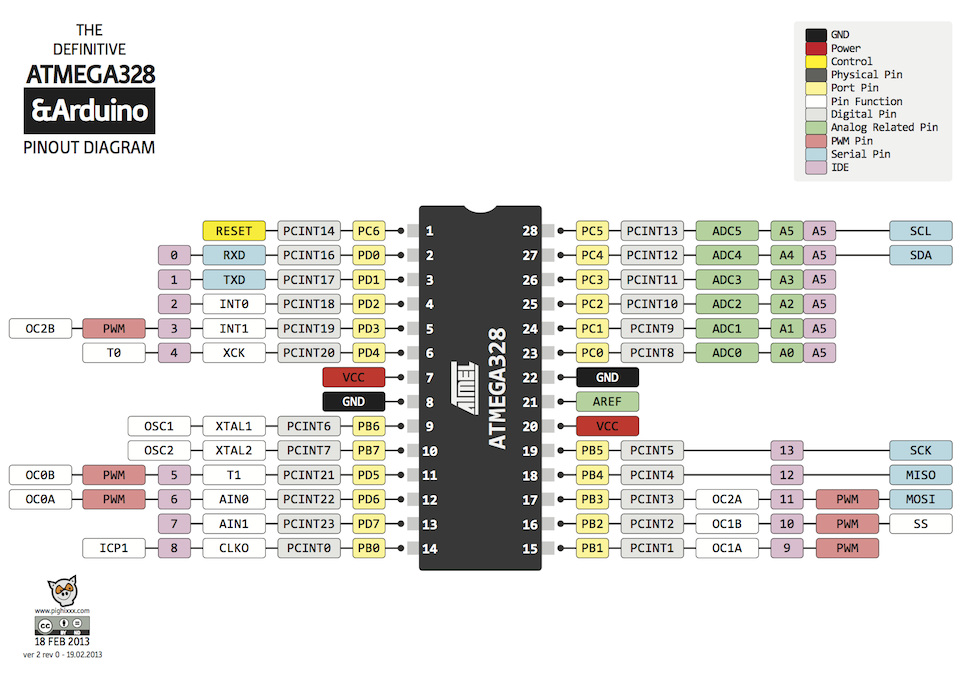
ATmega328P / Arduino pinout
C Reference Card
NASA Style Guide
The C Programming Langague Reference
Info needed for Labs
Determine Com Port
With Arduino plugged in to computer's USB port
Win 10 - Search for "Powershell" and open
Type - "Get-WMIObject Win32_SerialPort" (no quotes)
check results for Arduino Uno (Com __ )
Atmel Studio
Setup Strings:
C:\Program Files (x86)\Arduino\hardware\tools\avr\bin\avrdude.exe
-v -C "C:\Program Files (x86)\Arduino\hardware\tools\avr\etc\avrdude.conf" -p atmega328p -c arduino -P COM7 -b 115200 -U flash:w:$(TargetDir)$(TargetName).hex:i
To get printf to work with floating point values:
Project |
nameofproject Properties | Toolchain : AVR/GNU Linker | General | Check "Use vprintf library(-Wl,-u,vfprintf)"
Project |
nameofproject Properties | Toolchain : AVR/GNU Linker | Miscellaneous | Other Linker Flags put into textbox | "-lprintf_flt" (leave off quotes).